 English
 Deutsch
 Italiano
 Français
 Português
 ไทย
ไทย
 Tiếng Việt
 Polski
 Türkçe
 Nederlands
 Română
 한국어
한국어
 Svenska
 Español
Keeping a good trading journal is one of the easiest ways to improve your performance. It helps you track what works, what doesn’t, and how to avoid repeating costly mistakes. It is such a simple habit that neglecting it would be a crime.
At Forex Tester Online, we tested every journal in this list ourselves. In this review, we looked at trading journals that help active traders import data, track trades, and optimize one strategy across stock, futures, forex, and cryptocurrency markets.
Below, you’ll find our pick of the best journals, including the option we see as the best trading journal app. Each tool is simple enough for daily use, but detailed enough to help you spot mistakes, measure progress, and make better decisions over time.
Top Recommendations for Trading Journals
Before we get into each trading journal, here’s a quick side-by-side view of the tools we tested. We included options for traders in stocks, options, and cryptocurrency markets, plus a spreadsheet route for those who want full control over every trade and their overall performance.
| Tool | Best for | Main strength | Auto import | Replay / backtesting | Notes, tags, and review | Main drawback |
|---|---|---|---|---|---|---|
| FTO Trading Journal | Manual traders who want journaling and testing in one place | Built-in trading journal inside a full backtesting platform | No import focus | Yes – full manual backtesting with historical data | Yes – notes, trade stats, setup analysis | Best for manual testing, not for syncing live broker history |
| Tradervue | Traders who want clean reporting and easy post-trade review | Strong analysis with charts, tags, and broker import support | Yes | No dedicated backtesting platform | Yes – notes, charts, and trade review tools | Good for journaling and review, but not built for deep replay testing or all-in-one backtesting |
| Edgewonk | Traders who want deep behavioral trading journal analysis | Strong insight into habits, discipline, and mistakes | Yes | No dedicated backtesting environment | Yes – detailed tags, notes, screenshots, emotion tracking | Works best if you already use a separate testing platform |
| TraderSync | Active traders who want a clean interface and broker syncing | Easy-to-read reports and broad broker support | Yes | Yes – basic market replay | Yes – tags, notes, strategy comparison | Replay is more limited than dedicated backtesting tools |
| Trademetria | Traders who want lots of metrics and risk analysis | Wide set of analytics, visualization, and flexible dashboards | Yes | Limited simulator features | Yes – custom templates, filters, journal entries | Can feel busy at first and most serious features are paid |
| Excel / Google Sheets | Beginners or traders who want a free custom setup | Full flexibility and zero software lock-in | No | No | Yes – but fully manual | Takes more time, more effort, and less automation |
Using the table above, you can quickly see which journal fits your style before reading the full breakdown. Now let’s review each of these trading journals in detail.
1. Forex Tester Online: Trading Journal + Backtesting
Forex Tester Online is more than just a backtesting tool – it also works as a detailed trading journal. While you test your strategies manually, you can track trades, write notes, and analyze results right inside the platform.
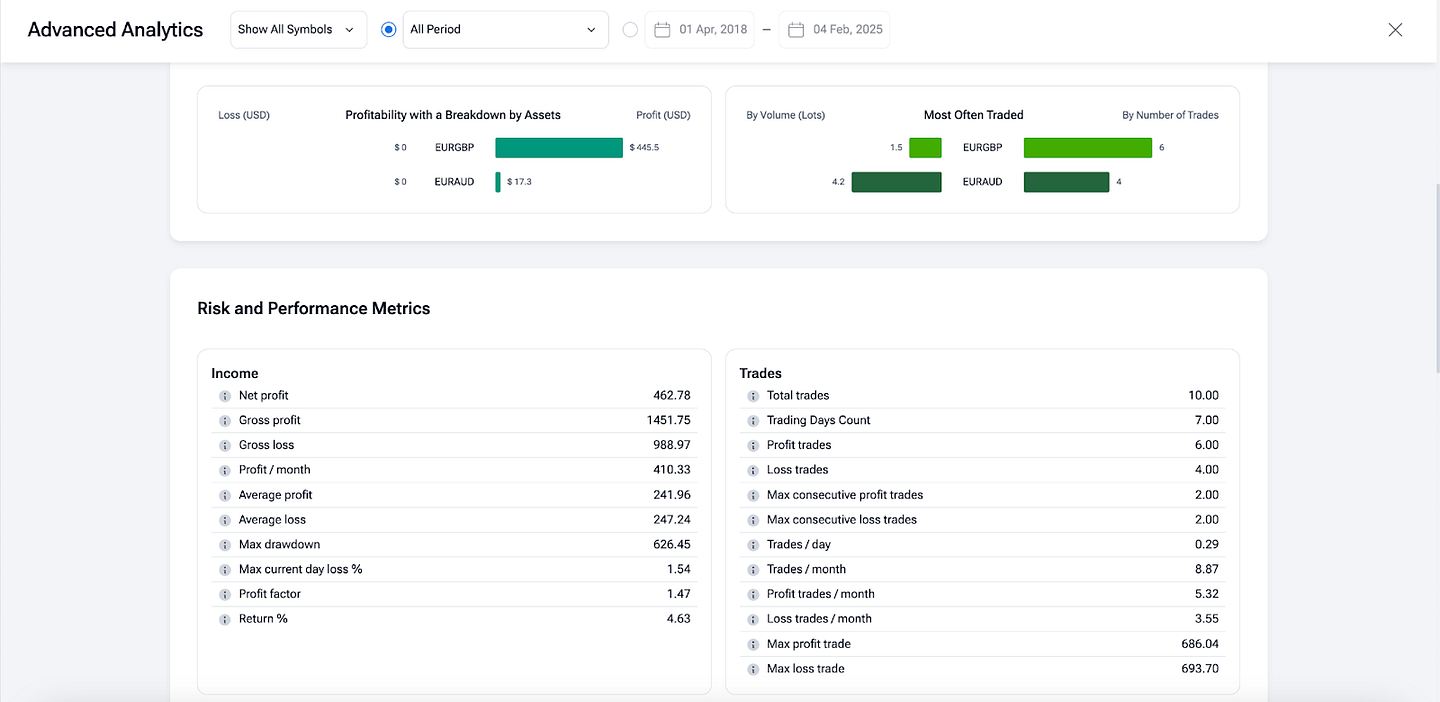
Every trade you place on the trading journal is saved with full stats: entry, exit, lot size, stop loss, profit/loss, and more.
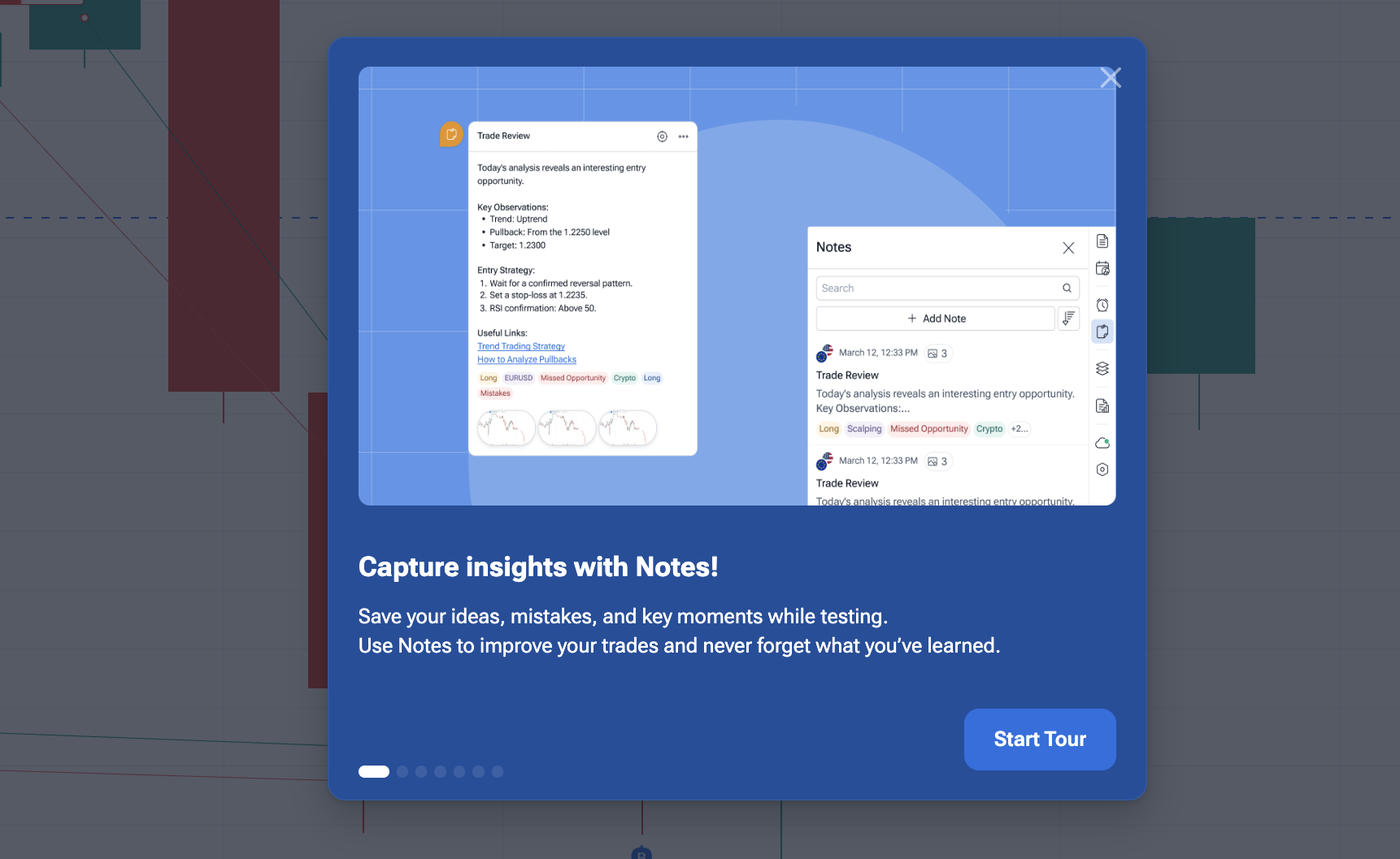
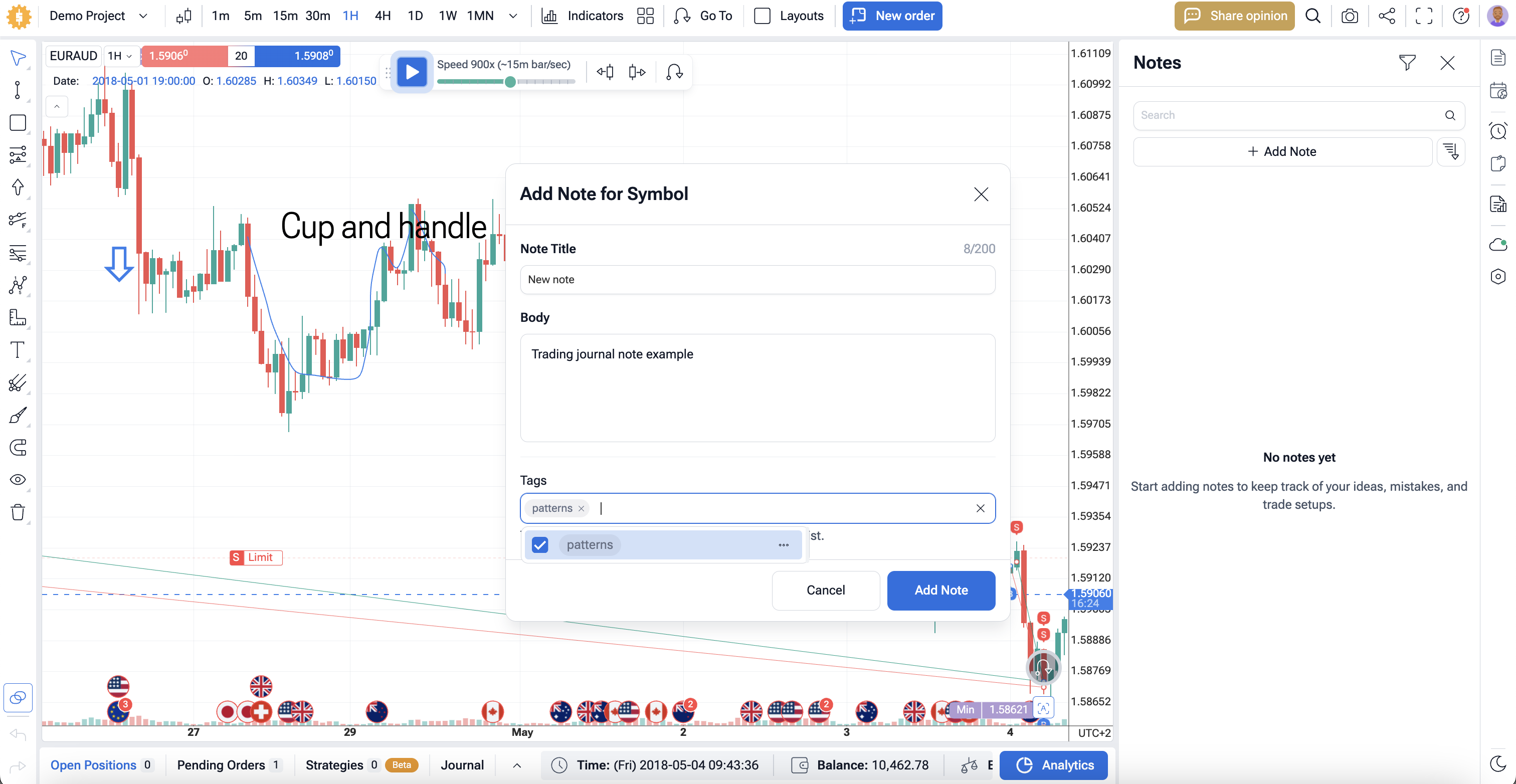
You can leave notes directly during backtesting. They will all be stored in one section. This helps you review your decisions later and spot patterns in your behavior.
You can also sort notes by tags and find them on the timeline. Use the “Jump to” feature to navigate the historical data graph and quickly find the event you need.
The platform also gives you detailed analytics — win rate, drawdown, risk-to-reward ratio, and more. You don’t need a separate journal tool. Everything is tracked automatically while you test your strategies using 20+ years of historical tick-by-tick data.
In short, Forex Tester Online gives you both a powerful backtesting environment and a built-in trading journal. It’s a great all-in-one solution for manual traders who want to improve by reviewing real test data and trade decisions together.
2. Clean Journal with Strong Analysis and Community – Tradervue
Tradervue is a trading journal built for traders who want clear reports without a messy interface. It supports stocks, options, futures, and forex, and it can import trades from many brokers and platforms. That makes it a practical choice if you want a trading journal that saves time and keeps your data in one place.
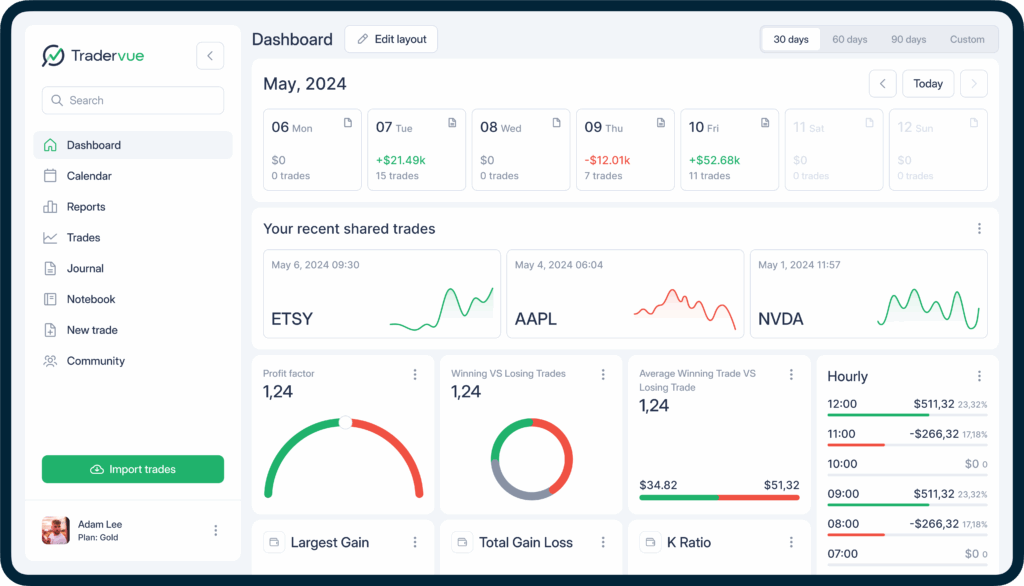
The main strength of Tradervue is its analysis. You can tag setups, add notes, review charts, and study reports to see where your results are strong or weak. Tradervue also supports commissions and fees in its reports, so your trading journal can show a more realistic view of your results instead of a cleaned-up version.
Another useful part is the community side. Tradervue lets traders share trades and get feedback, which can help if you want outside input on your execution or ideas. That gives this online trading journal a more social angle than some other tools in this list.
On the downside, Tradervue is mostly focused on journaling, reports, and review. It is not a full backtesting platform, so traders who want deep market replay or manual strategy testing may still need a separate tool.
3. Powerful Trading Journal With Deep Insights – Edgewonk
Edgewonk is one of the most popular digital trading journals, designed for traders who want to analyze their trades in detail. It supports all major markets — Forex, stocks, crypto, options, and futures. You can import your trades from most brokers in just a few clicks.

What makes Edgewonk stand out is how deeply it analyzes your trading behavior. It tracks not just your results, but how you trade — when you cut profits short, hold losing trades too long, or break your own rules. You’ll see patterns in your trades that aren’t obvious at first glance.
You can fully customize your journal with your own tags, filters, and metrics. Add screenshots, write detailed notes, and sort trades by strategy, time frame, or setup. Edgewonk’s charts and stats show what’s working and what’s holding you back.
Edgewonk also includes features to track emotions, evaluate discipline, and review your mindset on each trade. This makes it a helpful tool for traders who want to grow through consistent review.
It’s a great alternative for traders who already have a separate backtesting tool and want to keep a structured, data-driven trading journal. But if you’re looking for one platform that combines manual backtesting and journaling together, something like Forex Tester Online might be more efficient.
4. Good for Replay Features – TraderSync
TraderSync is a trading journal that helps you track your trades and spot patterns in your trading behavior. It works with more than 900 brokers and supports stocks, forex, crypto, options, and futures. You can import your trades automatically or enter them manually.
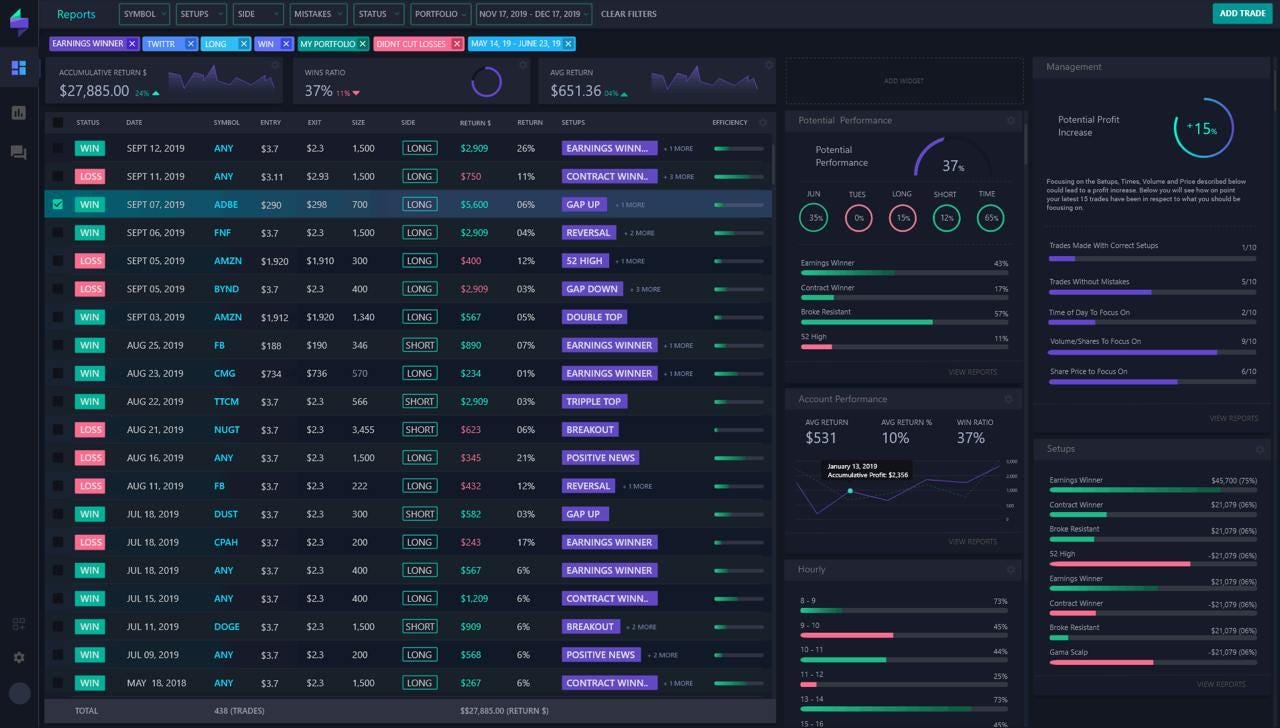
The main benefit of the TraderSync journal is its clean interface and clear mistakes tracking. The platform turns your trade history into simple reports and charts. You can quickly see which setups are working and which mistakes cost you money. This can help you adjust your strategy over time.
One of the standout features is the built-in market replay tool. It lets you go back and simulate trading scenarios using historical data. You can test your decisions and see how you performed in real market conditions. This is useful for day traders who want to improve their timing and setups.
TraderSync also includes tools to compare strategies and simulate how changes might affect your results. You can tag trades, write notes, and access everything from your phone with their mobile app.
On the downside, some users feel that the platform can be too focused on stock traders, and some of the more advanced features such as trading journal API are only available in paid plans. The market replay is also limited compared to dedicated backtesting platforms.
5. Best for Smart Metrics and Risk Management Tools – Trademetria
Trademetria is a trading journal and analytics platform built for traders who want more than just basic trade logging. It supports a wide range of markets — stocks, forex, crypto, futures, CFDs, and options — and connects with 400+ brokers for quick import.
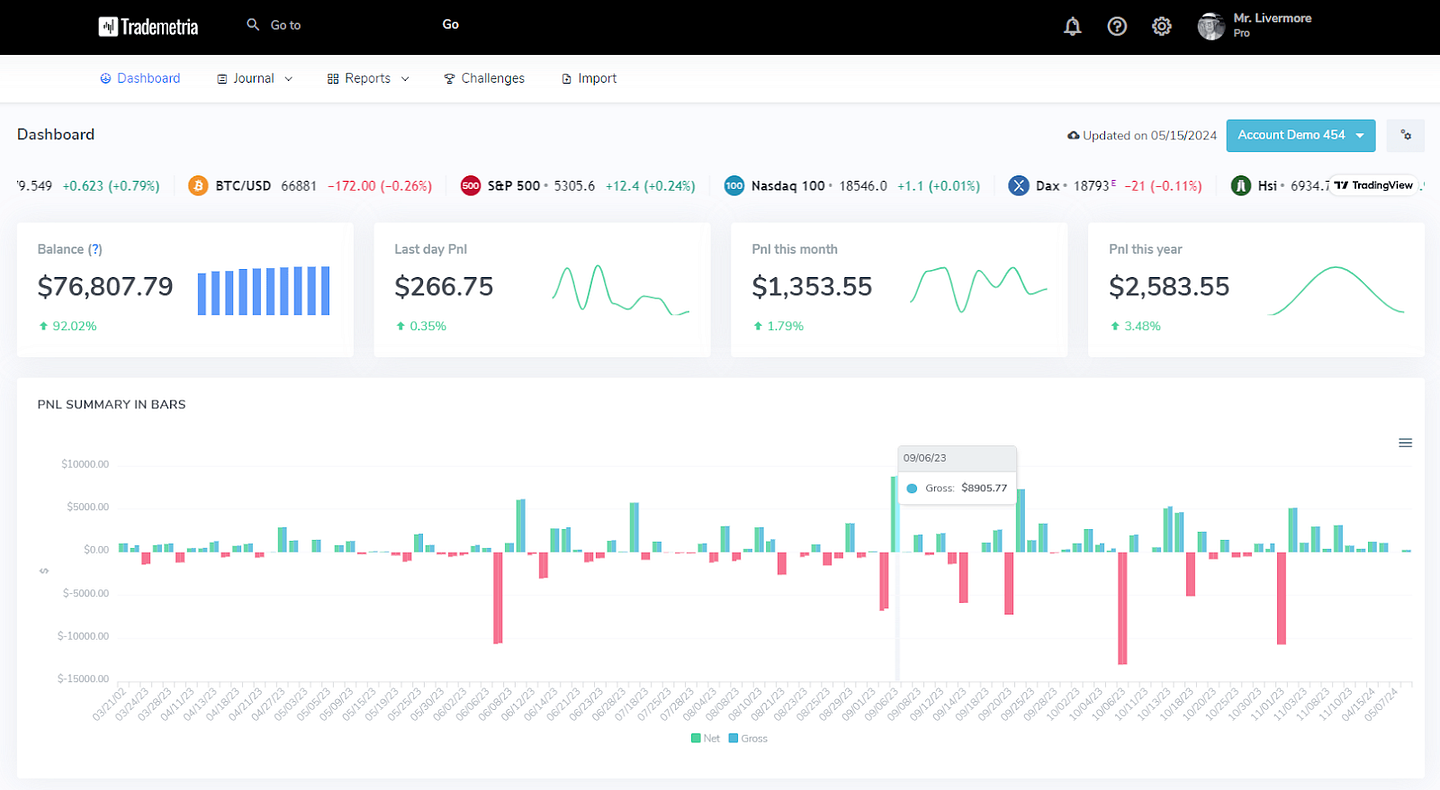
This trading journal tracks over 30 key trading metrics. You can break down your trades by strategy, market condition, instrument, or even time of day. It helps you find what works and where your risk habits may be costing you money.
One strong feature is the AI-powered journal assistant. It can generate entries for you and provide suggestions based on your trade history. There’s also a simulator that lets you test past trades to find patterns and missed opportunities.
Charts in Trademetria show entry and exit points directly on daily or intraday charts. This visual feedback helps you understand what setups work best for you.
Risk management is also covered. You can set stop-loss and target levels, track R-multiples, and use exit analysis tools to review how well you manage your trades. These features are useful, especially for day traders who want to stay on top of position sizing and risk per trade.
Customization is another plus. You can tailor dashboards, trading journal templates, and data filters to your style. There’s even a gamified “trading challenge” feature to track discipline and progress toward goals.
On the downside, some users may find this journal’s interface a bit busy at first, and the sheer number of features can be overwhelming. Also, while there’s a free plan, serious traders will need to upgrade to access most of the analytics and features.
6. Keep Your Trading Journal in Excel or Google Sheets
If you’re just starting out or prefer to keep things simple, Excel and Google Sheets can be used as free basic trading journals. Many traders still rely on spreadsheets to track trades, calculate metrics, and review performance over time.
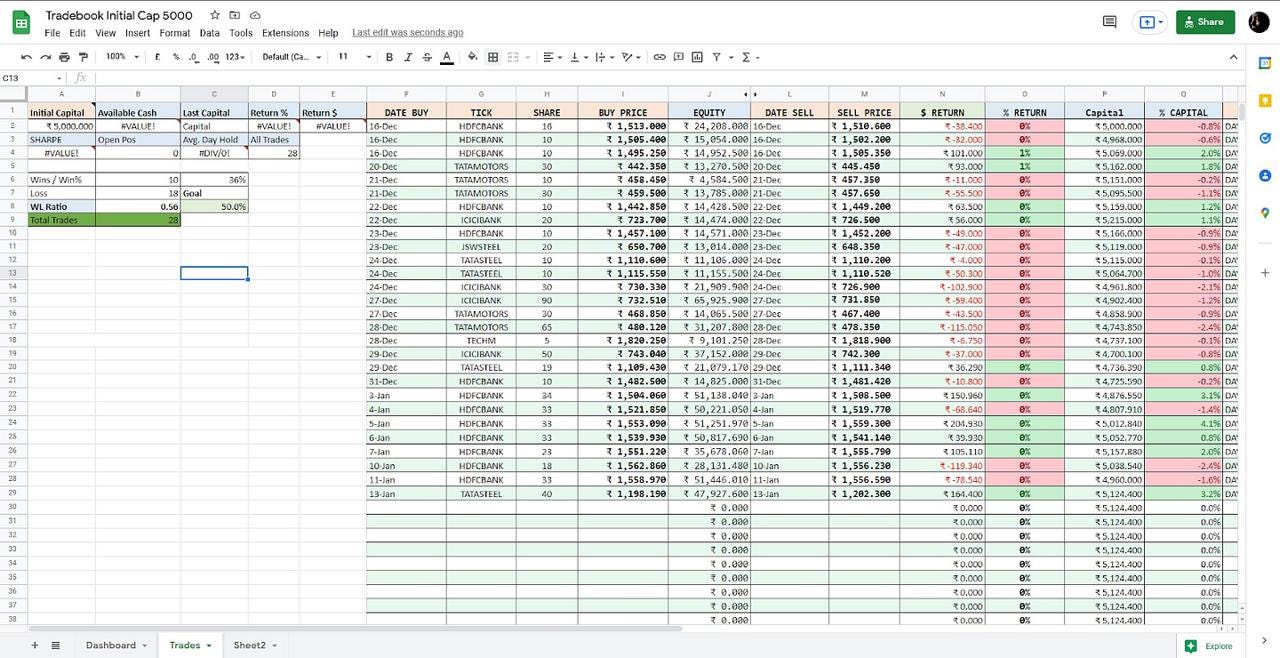
You can find free or paid templates online with built-in formulas to calculate key metrics like win rate, average return, profit factor, or drawdown. These templates are usually customizable, so you can adjust columns to match your trading style or strategy.
The biggest old-school trading journal benefit is for sure full control. You decide exactly what data to track, how it’s displayed, and which metrics matter. If you’re good with spreadsheets, you can build your own custom system tailored to your needs.
But there are downsides. You have to enter trades manually unless you set up a broker export and paste the data in. It’s also easy to make mistakes – one wrong formula can throw off your results. There’s no charting, visual analytics, or automated pattern recognition unless you build it yourself.
So, Excel or Google Sheets work well for traders who want a free, no-frills journal solution. They’re flexible and private, but they require more effort to manage and aren’t ideal for large volumes of trades or in-depth analysis.
What Is a Trading Journal?
It is a tool traders use to record, review, and analyze their trades. It typically includes details like entry and exit points, trade size, strategy used, market conditions, and the outcome. Many journals also track emotions and thought processes behind each trade. The goal is to identify patterns, refine strategies, and improve decision-making over time. Whether kept manually or through software, a journal helps traders stay disciplined and learn from both wins and losses.
What are the Main Features to Look For?
When choosing a trading journal, the goal is simple: pick something that helps you log trades fast, study mistakes, and improve decision-making over time. These are the features that matter most.
- Easy trading journal import
A good journal should let you import trades without wasting time on manual entry. This matters even more if you trade across stocks, options, futures, forex, or cryptocurrency. The less time you spend filling in rows, the more time you spend on actual review.
- Clear performance tracking
Your journal should show the numbers that matter: win rate, average win, average loss, drawdown, risk-to-reward ratio, and expectancy. If trading journal cannot show your real performance, it is not doing enough.
- Strong analysis tools
Basic logging is not enough. A solid journal should give you real analysis of your trades, setups, time of day, market conditions, and mistakes. This is where the useful insights come from.
- Custom tags and filters
You should be able to sort trades by strategy, setup, session, asset, or mistake type. That makes it easier to compare what works in forex versus stocks, or what setups fail most often in options and futures.
- Clean trading journal dashboard
A good dashboard should show the key stats at a glance. This is very important for overall user experience. You should not need to dig through menus just to see what is working and what is not.
- Notes, screenshots, and trade comments
The best trading journals let you explain why you entered, how you managed the trade, and what you felt during it. This turns raw numbers into something useful during review.
- Strategy comparison
A strong trading journal helps you compare one setup against another. That matters if you want to cut weak ideas and keep only the ones that actually hold up over time.
- Mobile access
A mobile app is useful if you want to check results, add notes, or review trades away from your desk. It is not required for everyone, but it helps a lot for active traders.
- AI assistant features
Some platforms now include an AI assistant that can summarize trades, spot habits, or suggest what to review next. This can be useful, but only if the core journaling features are already solid.
- Free trading journal plan or trial
A free version helps you test the platform before paying. That matters no less than pricing because a journal may look good on paper but still feel clunky in real use.
- Data protection
Your trade history is sensitive. Data security matters. At minimum, a good trading journal should make it clear how your records are stored and protected.
- Room to grow
A beginner may want simple logging. A more active trader may want deeper reports, better filters, and broader market support across stocks, options, futures, forex, and cryptocurrency. The right trading journal should still fit when your process gets more serious.
To sum up, look for fast import, useful analysis, a clean dashboard, strong performance stats, and reliable data security. Everything else is secondary.
Conclusion
If you’re looking for a no-code backtesting and journaling tool in one, we recommend Forex Tester Online as the best trading journal software. It lets you test strategies using historical data and add notes and analytics, all in one platform.
Tradervue, Edgewonk, TraderSync, and Trademetria are great for traders who want in-depth performance reviews, pattern detection, and custom reporting.
And if you prefer full control and simplicity, free Excel or Google Sheets might be enough.
In the end, the best trading journal is the one you’ll actually use consistently.
FAQ
Which trading journals support automation and broker integration?
Many modern platforms support automatic imports and direct broker integration, so your trading journal updates with much less manual work. Tools like TraderSync, Trademetria, Tradervue, and Edgewonk are usually picked for this, especially by traders who want faster logging and cleaner reports.
Can I track multiple asset classes (stocks, forex, crypto, etc.) in one journal?
Yes, many trading journals let you keep different markets in one place, including stocks, futures, forex, and cryptocurrency. That makes it easier to compare results across markets and see where your edge is actually strongest.
Do trading journals offer community features or mentorship opportunities?
Some do, but not many make this a core feature. Tradervue is one of the better-known examples with a community angle, where traders can share ideas and review trades together. Most journals, though, focus more on private analysis than on mentorship.
How do I choose between a desktop and mobile trading journal app?
Pick a desktop trading journal first if you care more about deep review, larger charts, and detailed reporting. Pick mobile if you mostly want quick updates, notes, and fast access during the day. For most traders, the best setup is simple: use desktop for serious review and mobile for convenience.

Forex Tester Online
Trading Journal + Backtesting


